Blue billboard displaying Make Every Word Count above adcorrector.com

Before your ad goes live

Free Billboard Testing for Real-World Visibility

Outdoor ads are read in seconds, from a distance.
Get a grade and your top fixes.

Test Your Ad Now
  • Free to use
  • No signup
  • Runs in your browser

Upload flat artwork (JPG or PNG, up to 10 MB).
Rule-based scoring. Same input, same result.

How it works

Four steps from artwork to your top fixes

Results in seconds, scored on contrast, copy length, clarity at speed and more.

  1. Set the conditions

    Pick your goal, ad format, traffic speed and viewing distance.

  2. Confirm the copy

    Check the detected text, so scoring uses your exact words.

  3. Review your results

    Your grade, a ranked Fix First plan, Simulator Beta scenes and a downloadable report.

Sample results

Results Preview

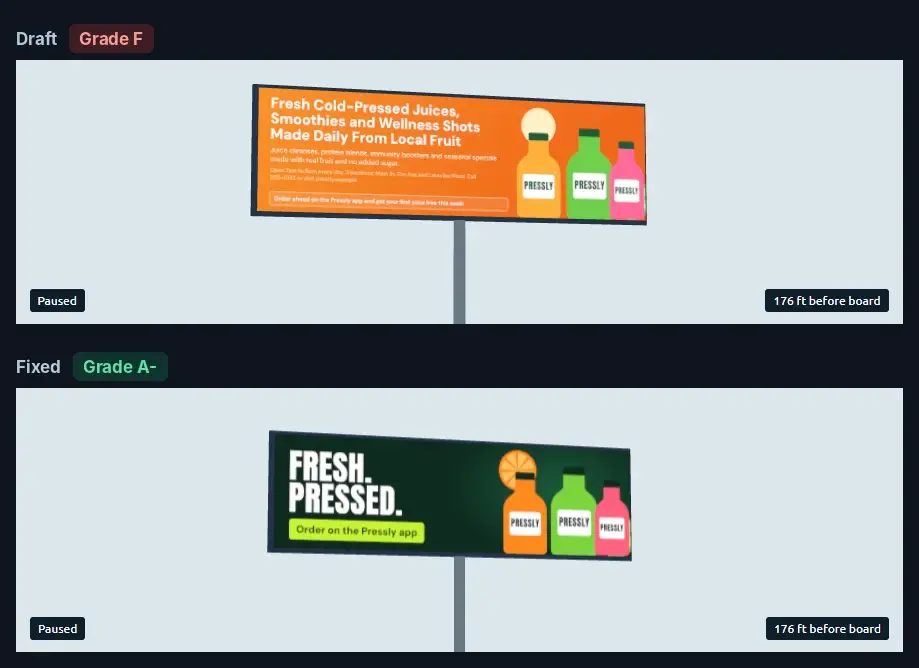
Real tool output for a sample ad: your grade, fixes and previews.

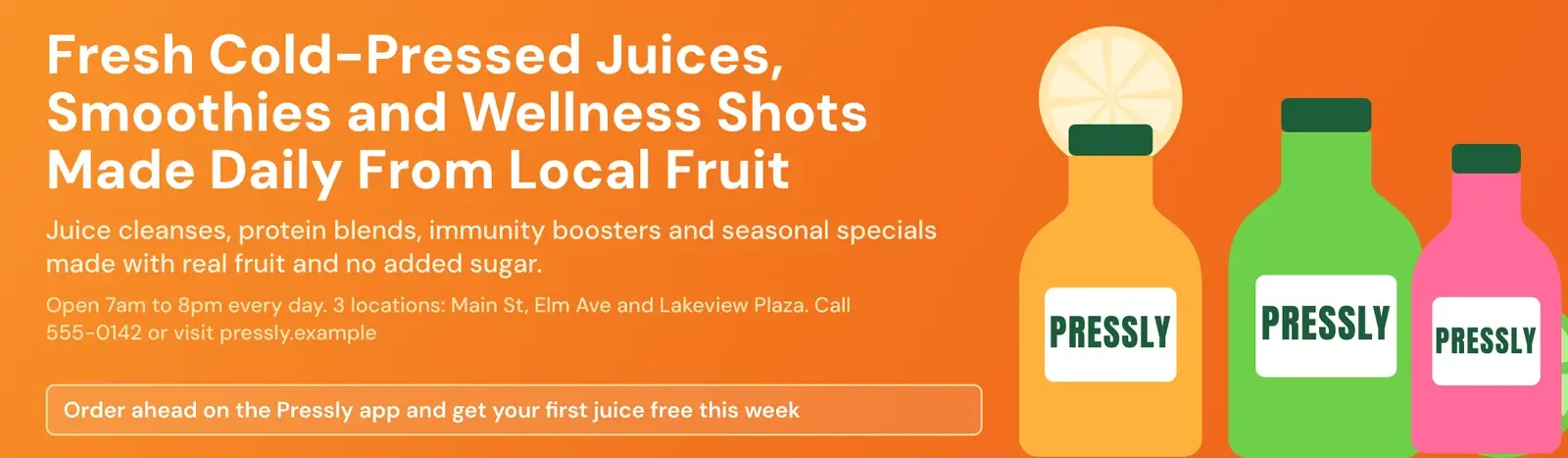
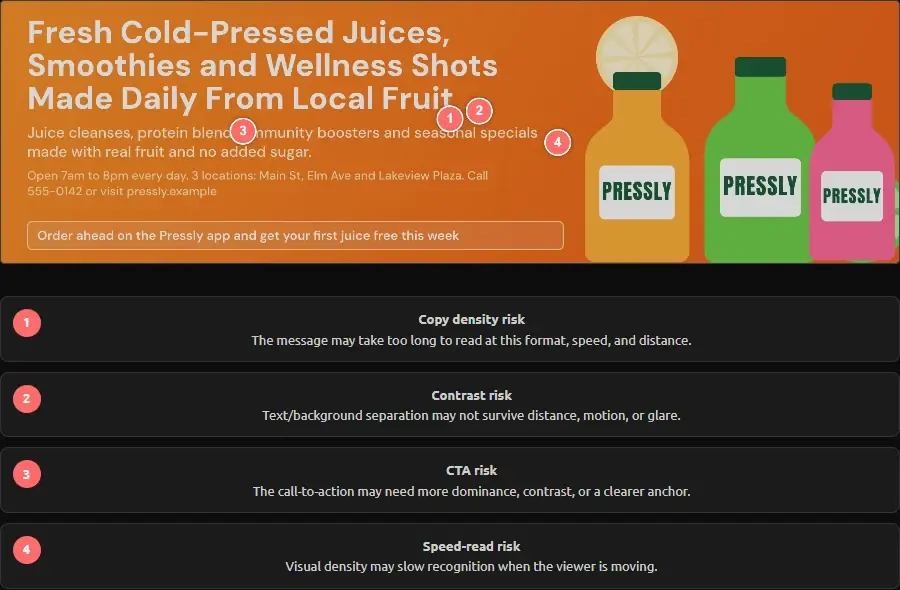
Sample juice billboard first draft: Fresh Cold-Pressed Juices, Smoothies and Wellness Shots Made Daily From Local Fruit, with small supporting copy and a long call to action in white text on a bright orange background

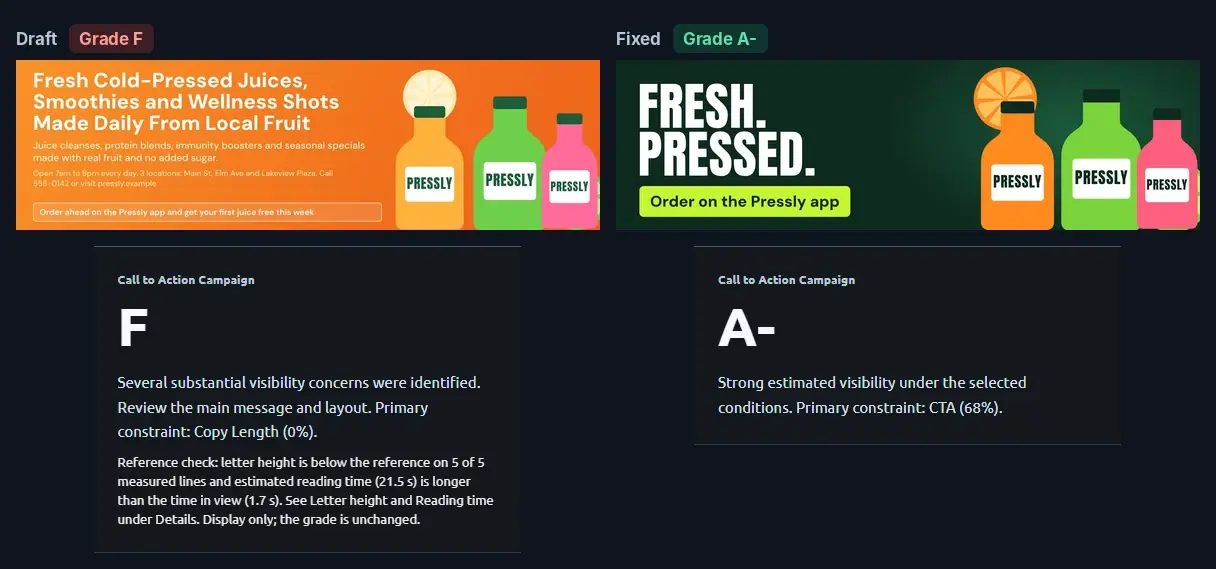
Sample adA first draft for a fictional juice brand: too much copy and white text on bright orange, checked at 65 mph and 600 ft.

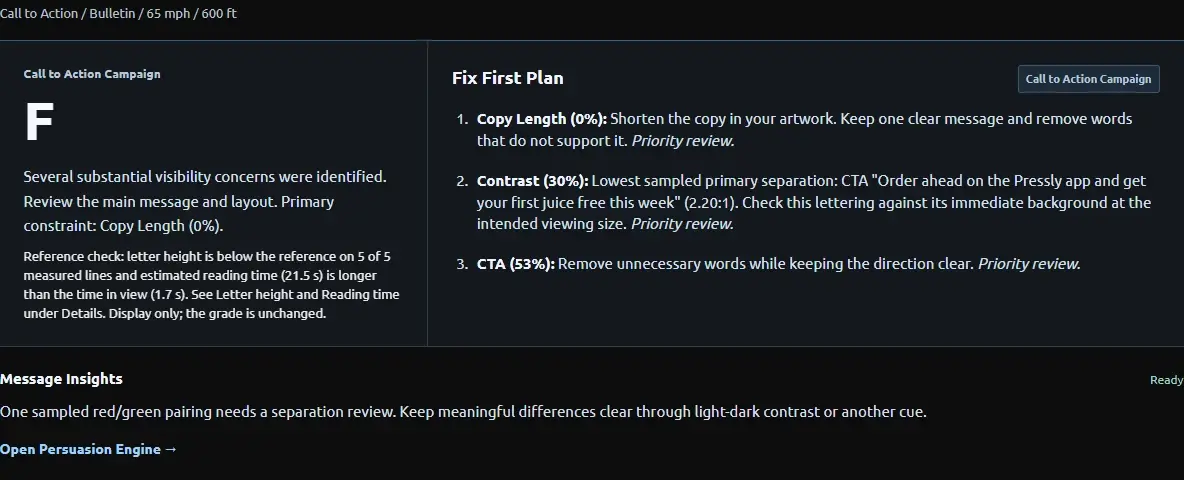
Ad Corrector overview showing an F grade for the draft juice billboard, with copy length as the primary constraint and a fix-first plan for copy length, contrast and CTA

Your grade, and what to fix first.

Test your outdoor ad →

No signup required. Results delivered in seconds.

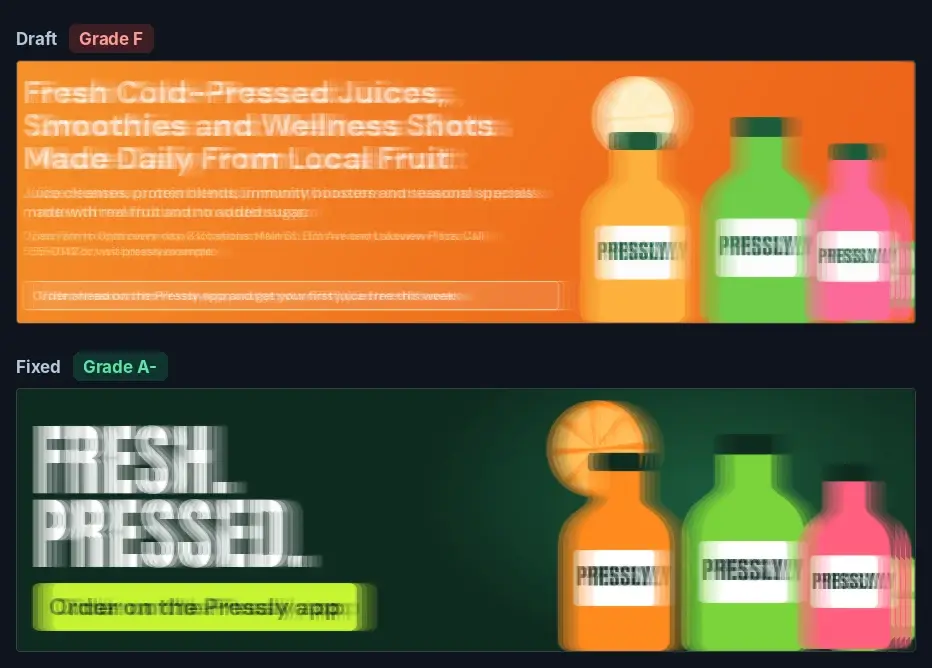
Design View / Speed View
See what detail may survive at speed.
Example demo. Upload to see your design below.
Not sure how this works? Watch a short demo

Quick start

How Ad Corrector Works

  1. Upload your outdoor ad design. Use a JPG or PNG of your flat artwork, up to 10 MB.

  2. Choose your campaign goal and viewing conditions.Pick your outdoor ad format, speed and viewing distance.

  3. Review your headline, CTA and supporting copy.Then select Confirm Text & Analyze.

  4. Explore your results.See your grade and Fix First plan, then download your report.

Step 1 · Technical review

Ad Corrector®

Professional billboard visibility analysis

  1. 01 Upload artwork
  2. 02 Check text & settings
  3. 03 Explore results

Upload Your Billboard Design

Drag and drop or click to upload (JPG, PNG, max 10 MB)

Secure & confidential - your design stays private

Design Details

Campaign Goal

Choose how this creative is intended to work before reviewing the copy.

Select the type of billboard for your design
Expected speed of passing traffic in miles per hour
Distance from which the billboard will be viewed

Viewing Condition Starting Points

Choose a starting point, then adjust speed and distance to match the actual media plan.

Check your ad's text

For best results: Review all copy, including smaller text, before scoring, and enter it exactly as shown. Text detection works best with English; you can type your copy in any language.
CTA scoring note: Leaving the CTA field blank will score the ad as having no CTA.
Enter the main headline text for your billboard
Enter your call-to-action text
Enter optional supporting text for your billboard

Analysis Results

Directional OOH visibility review based on uploaded artwork, selected viewing conditions, and copy entered by the user.

A
Visibility summary will appear here after analysis.

Fix First Plan

Call to Action Campaign
  1. Run analysis to generate prioritized fixes.
Message InsightsWaiting for analysisYour message interpretation will appear after analysis.Open Persuasion Engine →

Your artwork, in context

View measurements →

Run analysis to reveal issue markers.

Motion blur preview
65 mph • 600 ft
An illustrative effect, not a prediction of what a driver will see.

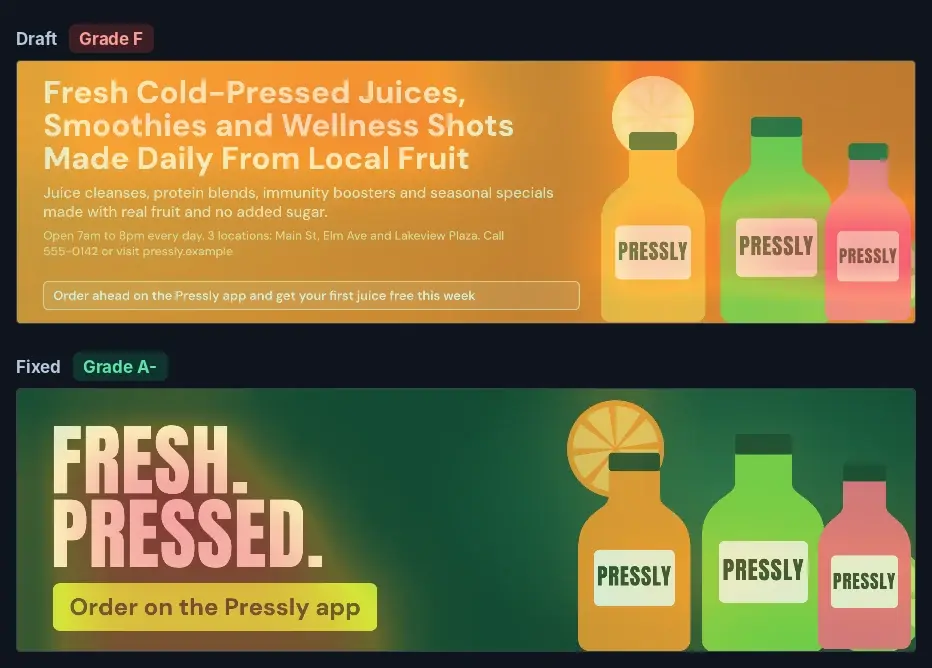
Red: busier areas
Yellow: moderate detail
Green: quieter areas

Colors compare local light-dark variation. They are a detail guide, not a design grade; this view does not change the score.

Illustrative washout preview.
Actual lighting and display performance depend on the placement. This preview does not change the score.

Scenario Simulator

Adjust viewing conditions, preview the speed view instantly, then re-run the score when the scenario changes.

A/B Version Compare

Save the current analysis as Version A or B, then compare creative revisions side by side.

Workflow: analyze the first creative, save as A, click Analyze Another, analyze the revision, then save as B. Matching test conditions make the comparison more useful.

Save Version A and Version B to compare score movement.

Evidence & next steps

Text Contrast & Palette Checks

Primary Text Contrast
-
Lowest Primary Ratio
-
Palette Pair Check
-

Directional estimates only. Verify final artwork against applicable accessibility, brand, production, and media-owner requirements.

đź”§ Additional Observations

âś… What's Working

Saved Tests Private to this browser

Save up to five analyses, including artwork and entered copy, on this device. Nothing is sent to Ad Corrector®; remove saved tests anytime.

No tests saved on this device yet.
Ad Corrector® results are directional estimates based on OOH visibility principles, uploaded artwork, and user-entered copy. This is not legal, accessibility, production, media-owner, or performance certification.

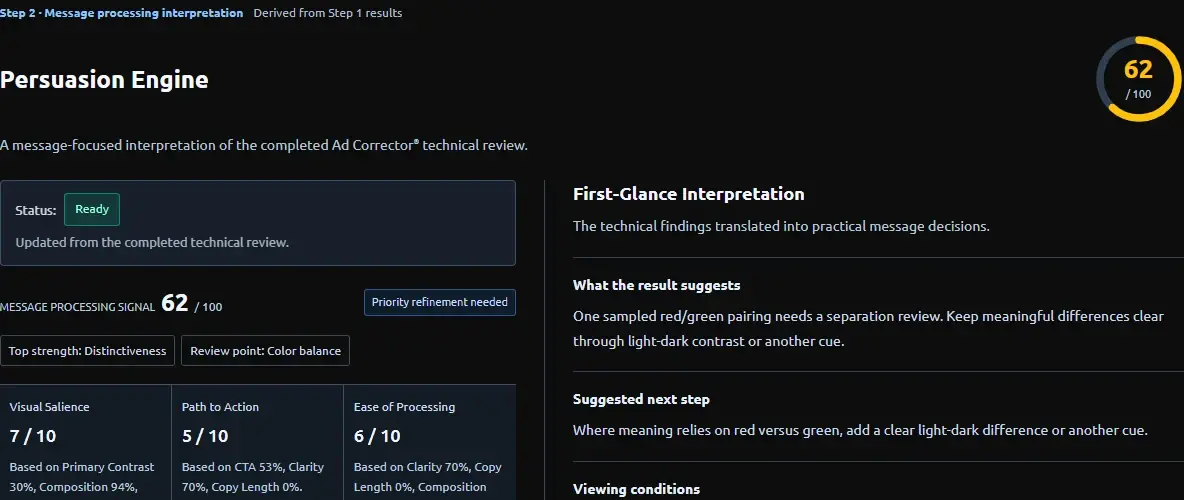
Step 2 · Message processing interpretation Derived from Step 1 results

Persuasion Engine

A message-focused interpretation of the completed Ad Corrector® technical review.

Message insights will follow your completed technical review.

Waiting for analysis
Status: Waiting for Step 1
Run visibility analysis first. This section updates automatically when complete.
Message processing signal – / 100
Pending analysis
Top strength: – Watch point: –
Visual Salience
– / 10

Path to Action
– / 10

Ease of Processing
– / 10

The five signals share Step 1 findings; they are related views of the same analysis.

First-Glance Interpretation

The technical findings translated into practical message decisions.

What the result suggests

Waiting for Step 1 analysis to complete.

Suggested next step

—

What to keep

  • Strengths will show here once analysis completes.

Built for how OOH is actually seen.

People don't stand around studying outdoor ads. They glance. They move. They're gone.

Review your artwork, copy and layout under selected viewing conditions. Ad Corrector provides directional findings and practical next steps before production or launch.

Test your outdoor ad

Judging whether an outdoor ad is readable should not take meetings, decks or weeks. Ad Corrector exists to make that check simple.

FAQs

FAQs Continued

These questions cover more technical or advanced topics.

Billboard Testing Knowledge Base

How Billboard Testing Works

Billboard pre-flight testing reviews outdoor advertising creative before production or launch. Ad Corrector scores copy length, text contrast, clarity at speed and layout from your uploaded artwork, entered copy and selected viewing conditions. It focuses on how easily viewers can understand your message, not on campaign performance.

No signup. Results delivered in seconds.


OOH Education Articles

Clear thinking for outdoor advertising.

A reference to keep

OOH Pre-Flight Creative Checklist

A practical reference for reviewing outdoor advertising creative before launch. Check message clarity, legibility and layout alongside the intended viewing conditions.

Open the PDF

Opens in a new tab.

OOH education

The 10-Foot Walkback Test vs. Ad Corrector

What the paper test measures well, what it misses, and the distance and time math behind reviewing artwork for its intended outdoor placement.

Why OOH Ad Testing Matters

A pre-flight review gives you a chance to address copy length, text contrast and layout before production or launch. Use Ad Corrector to check your outdoor ad under selected viewing conditions and identify practical next steps.

Featured On

Ad Corrector – #1 Product of the Day on PeerPush Featured on LaunchIgniter Featured on NextGen Tools Featured on twelve.tools Ad Corrector – Featured on Startup Fame

Also mentioned in product roundups, including IndieProducts.io.

Directory partner

GoodFirms Partner